
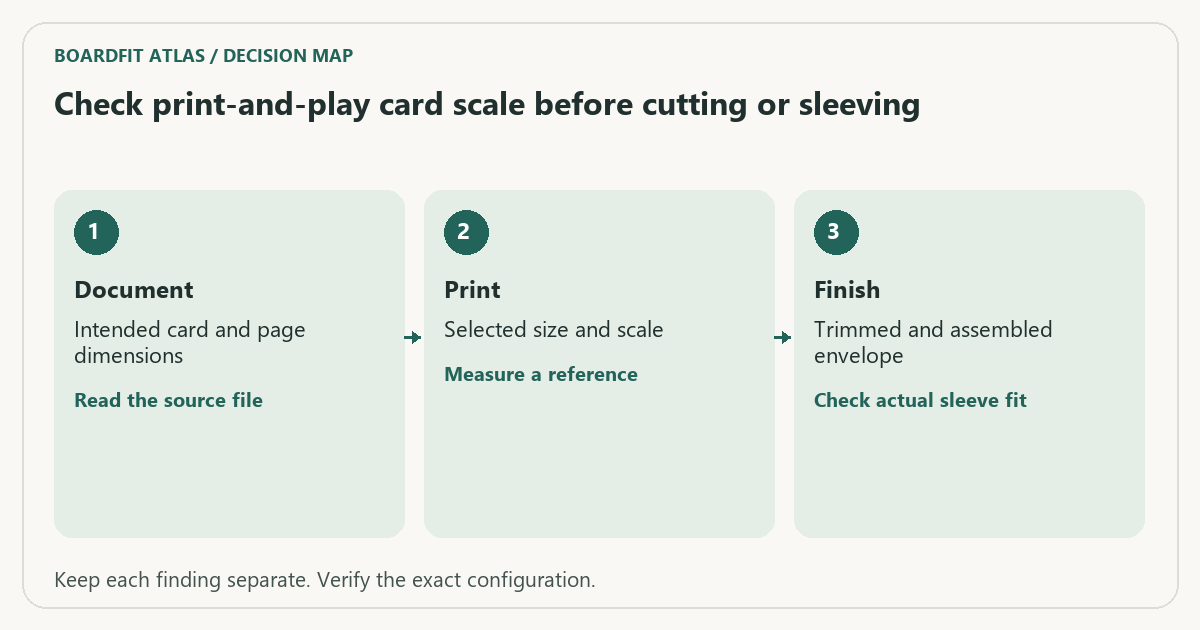
Answer: Print a permitted test page at the intended scale and measure a reference dimension before cutting a full deck. A PDF’s nominal page size does not establish the final card size.
BoardFit Atlas editorial project · Updated October 21, 2026 · Original decision framework and illustrative example. No physical product measurement or hands-on benchmark is claimed.
On this page: Why the distinction matters · A practical sequence · Decision record · Worked example · Verify the result · Question and answer · Sources and scope
Why the distinction matters
A print dialog can fit a page to the printable area, changing every card dimension. Once a deck is cut, that scaling error can be mistaken for the wrong sleeve size. Use files you have permission to print and follow the designer’s intended page size. Separate print scale from cutting accuracy: a correctly scaled outline can still be trimmed inconsistently.
A practical sequence
- Read the designer’s paper-size and scaling instructions, including any reference square.
- Check the document size, selected paper and scaling mode before printing one plain-paper test.
- Measure the printed reference with a ruler and compare both axes.
- Only then evaluate cutting marks, card assembly and the finished sleeve fit.
Decision record
| Check | What it means | What to verify |
|---|---|---|
| Document | Intended card and page dimensions | Read the source file |
| Selected size and scale | Measure a reference | |
| Finish | Trimmed and assembled envelope | Check actual sleeve fit |
Worked example
A hypothetical 63 mm-wide card printed at 97% becomes 61.11 mm wide. Over a 100 mm reference, the output would measure 97 mm. Changing sleeves would not correct that scale error. Return to the print settings before committing paper, ink and cutting time to the whole deck.
Verify the result
Keep the verified print settings with the project and test again after changing printers or applications. Borderless enlargement can also alter dimensions. A measurement at one axis should not hide skew or distortion at the other.
Download the editable CSV worksheet · Box-fit workbook
Question and answer
Does choosing 100% guarantee perfect dimensions? It establishes the requested scale, but measure the output. Printer behavior, source design and finishing still affect the result.
Sources and scope
- Adobe Acrobat: page sizing for print — Distinguishes scaling modes. Printer margins and supported media remain model-specific.
The decision sequence, diagrams, worksheet and worked case are our editorial work. AI assisted research, drafting and implementation. Official references support the named technical distinctions; examples do not establish real product performance.
Continue the task
- Sleeve thickness and storage: measure the deck
- Keep the right rulebook and reference version with a game
- Browse the complete resource library
Use a reference card and a deliberate shrink example
Download the BoardFit Atlas card-scale control PDF (A4 on page 1, US Letter on page 2). Choose the page matching the physical sheet and print at 100% with no Fit, multiple-page layout or borderless expansion. The left outline is an example 63 × 88 mm card. The right outline is deliberately 97% of that size: 61.11 × 85.36 mm. Neither is a claim about every game’s card dimensions.
Measure the 100 mm ruler first, then the width and height of the left outline between the line centres. If the reference is already wrong, stop before cutting a full deck. Check document size, page scaling and driver settings. A correct ruler on the control sheet is a useful check of that print path, but does not establish that a different game PDF was exported at its intended dimensions.
The smaller outline illustrates the loss from a three-percent shrink: 1.89 mm in width and 2.64 mm in height. It is deliberately drawn that way in the file, not a measured fault on a printer. Comparing the two outlines makes a percentage error visible before you blame a sleeve or template.
Once the print scale is right, cut one expendable sample on the intended material and check the sleeve’s opening, seams and closure without forcing it. A flat paper rectangle cannot represent laminated thickness, rounded corners, card rigidity or the height of a sleeved stack. Read the creator’s intended trim size and test the actual finished construction before producing the deck.
Keep scale checking separate from sleeve purchasing: count active cards and spares by exact sleeve product, and use a measured stack for the storage plan. Do not substitute the example rectangle for the dimensions of your own edition.
Digital checks: page boxes, vector dimensions and SHA-256 checksums · generation and verification script. The script requires Python, ReportLab and pypdf. The files were generated on November 9 and published after review on November 10, 2026. These are digital checks, not physical printer tests.
Build on what you just learned
Your next useful step.
Choose sleeves, then check the complete deck.
Boulder 100+ or Bastion 100+ XL for a board-game deck?
Choose a rigid deck case around the finished sleeved stack and the way you remove cards.
Read the guide →Board game card sleeves: size, thickness, and storage
Short answer. Match the sleeve to the card, then check the sleeved card and the full deck against the storage space. Card fit and…
Read the guide →